Mix & Paint
- 4.6
- Rating
- 10.00M
- Installs
- Free
- Price
 Analysis by App-foxy
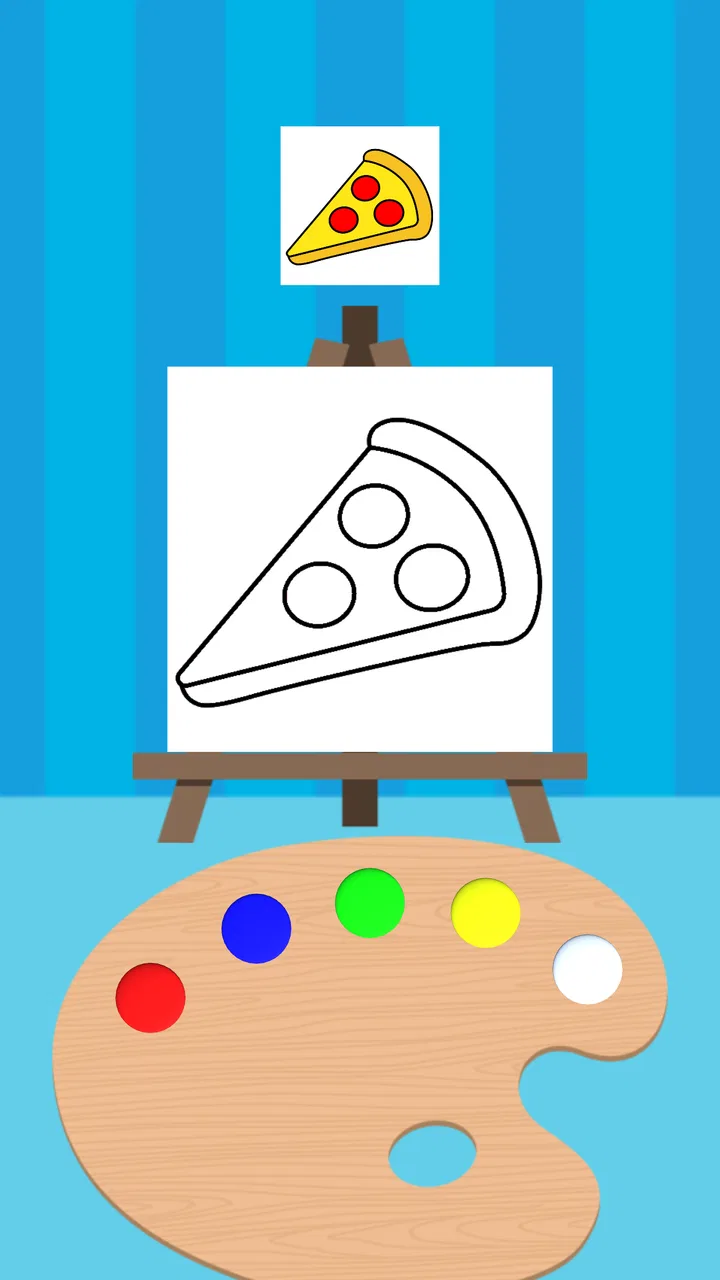
I did not expect a game built around color mixing to hold my attention for long, but Mix & Paint makes a surprisingly good first impression. Its central idea is easy to understand: create the requested color, then paint with it. That simplicity is exactly what makes it approachable, especially when I want something calm that I can play without learning a complicated control scheme.
At the same time, the game is not simply a digital coloring book. The satisfaction comes from judging colors, adjusting my approach, and trying to complete each task cleanly. The best moments are short and focused rather than dramatic, so this is much more suited to quick sessions than to players looking for a large adventure or a deep arcade campaign.
How the color-mixing idea works in practice
The main appeal is the direct connection between the action and the result. I am not just tapping through a menu or watching an animation; I am making a color and seeing how that choice affects the painting task. That gives every small decision a visible consequence, which is a strong fit for a touchscreen.
You May Also Like

 Blood Strike: 2.5 Anniversary
Blood Strike’s Loadouts Turn Every Drop Into a Tactical Gamble
A close look at Blood Strike’s custom loadouts: how fast access to signature weapons reshapes its battle royale rhythm, rewards preparation, and narrows the gap between fights.

 Pandora - Music & Podcasts
Pandora’s Music Is Easy to Start, but Harder to Recover
Pandora’s strength is its low-effort path from a seed to a station. Its weak spot is how much confidence it asks you to place in connection, setup, and quiet recovery.

 8 Ball Pool
 Is Built on Rivalries, Rematches, and Routine
A close look at the rivalries, rematches, shared routines, and unanswered safety questions that turn a quick pool match into a persistent mobile community.

 Samsung Music
’s Quiet Strength Is Playing What You Already Own
Its reach comes less from spectacle than from dependable access to a personal library. That simplicity is both the app’s strongest retention engine and its ceiling.

 AccuWeather: Weather Radar
AccuWeather Review: A Quick, Clear Forecast for Everyday Decisions
For everyday plans, the best forecast is the one you can understand quickly. AccuWeather makes rain timing, radar, and local conditions easy to act on, with a few trade-offs.

 Hill Climb Racing
Why Hill Climb Racing Still Turns Crashes Into One More Run
A tiny car, a bumpy hill and one more upgrade: Hill Climb Racing keeps resurfacing because its simple chaos makes every near-miss feel personal.
More From Our News Desk



The controls are immediately readable. I can begin without studying a tutorial for a long time, and the early objectives give me a clear reason to keep experimenting. This matters because the game’s hook is not a complicated story or a large collection of characters. It is the small pleasure of getting a color right and moving on to the next challenge.
My first useful goal was simply accuracy. Once that became familiar, I started paying more attention to efficiency and consistency. A careless mixture can make a task feel less satisfying, while a well-judged one creates a clean sense of completion. That gradual shift from “What do I tap?” to “How can I do this better?” is where the arcade design starts to work.
For an everyday example, I can imagine opening it while waiting for a coffee or sitting on public transport. A short session gives me something active to do without demanding sound, a long narrative commitment, or a large amount of free time. I can stop after a few tasks and return later without feeling that I have lost the thread of a complicated plot.
The game is free, which makes that low-commitment format easier to appreciate. Its content rating is Everyone, so the basic concept is suitable for a broad audience. I would still describe the experience as best for people who enjoy visual puzzles and gentle arcade repetition rather than players who need constant action or a competitive multiplayer environment.
Early goals are simple, but they establish the rhythm well
The opening stretch succeeds because it gives me a clear target almost immediately. I am not asked to understand a large progression map before playing. Instead, each task acts as a small lesson in the game’s central interaction. The goal is concrete, visible, and easy to judge.
That clarity is especially helpful for younger players and anyone who normally avoids arcade games because of complicated controls. The game communicates through the color result itself. When the mixture looks right, I understand why I succeeded; when it does not, I can usually see that my choice needs adjusting.
There is also a useful difference between knowing the theory of color and applying it under the game’s conditions. I may understand that certain colors combine to create another shade, but the practical challenge is recognizing what the current task is asking for and acting with enough care. That gives the early objectives more substance than a simple tap-to-win sequence.
One tip I found helpful is to slow down during the first attempt at a new type of color task rather than immediately tapping through it. The game rewards observation more than frantic speed. Looking at the target first helps me avoid wasting a move based on a quick guess, and it also makes later attempts feel more deliberate.
Progress is felt through improving judgement rather than a dramatic story
The progression here is mainly experiential. I notice myself becoming more comfortable with the visual language of the game and more confident about what a task requires. That is a different kind of progress from unlocking a new character, building a large collection, or following a narrative campaign.
This approach will appeal to players who like small, repeatable goals. Completing one task gives me a modest sense of achievement, and several completed tasks create a natural stopping point. The game does not need to overwhelm me with rewards because the immediate feedback is the reward: the color is closer, the painting is more complete, and the next objective is ready.
That also creates the first important trade-off. If I need explicit milestones, a detailed upgrade path, or a strong sense of long-term accumulation, the progression may feel light. The experience is built around repeated improvement in a focused activity, not around managing a growing collection of resources.
I think this is where the game’s large audience makes sense. It has reached over ten million installs, and its average rating is 4.6 from around forty thousand ratings. Those figures suggest that the straightforward idea works for many people, but they should not be read as proof that every arcade fan will enjoy it. A player who wants constant novelty may find the repeated color-based structure narrower than expected.
For me, the strongest progress signal is the reduction in hesitation. Early on, I treat each color as a guess. Later, I start forming a plan before acting. That is a subtle but meaningful improvement, and it gives the game more staying power than its one-line premise might suggest.
The difficulty curve depends on attention more than reflexes
Mix & Paint feels closer to a visual precision challenge than to a traditional reflex-heavy arcade game. I do not play it for rapid movement or elaborate combos. I play it because the task asks me to compare, mix, and correct. That makes the difficulty curve feel gradual when I approach it patiently.
The challenge rises when a color becomes less obvious or when a small mistake is more noticeable. At those moments, the game asks me to stop relying on instinct. I have to inspect the target, consider the mixture, and accept that rushing may be less effective than taking a second to think.
This is a good form of difficulty for a relaxing session because failure does not feel like a punishment for lacking fast fingers. It feels more like feedback about my judgement. I can usually identify what went wrong, which encourages another attempt instead of making me want to quit immediately.
Still, the same quality can become a limitation. Players who enjoy sharp timing windows, escalating speed, or increasingly intense pressure may find the pacing too gentle. The game’s challenge is controlled and visual, so it does not provide the adrenaline of a conventional arcade title built around reaction time.
A practical way to get more from the difficulty is to treat each task as a small experiment. Rather than tapping randomly until something works, I try to remember which adjustment moved the result closer to the target. That turns repetition into learning. It also prevents the game from becoming a purely automatic routine.
The visual nature of the challenge makes it suitable for short breaks, but it also means screen conditions can matter. On a small phone display, subtle color differences may require more attention than they would on a larger screen. I would choose a well-lit position and avoid judging a delicate shade while distracted. That is not a flaw unique to the game, but it is relevant to anyone expecting effortless play in every situation.
What keeps me playing, and where the retention weakens
The strongest reason to return is the low friction. I can understand the task quickly, complete a small objective, and leave. That structure works well when I want a game that does not demand a long uninterrupted session. The next challenge is easy to approach because the basic interaction remains familiar.
There is also a quiet “one more” effect. When a color is almost right, I want to try again and improve the result. The motivation is not based on a dramatic cliffhanger; it comes from the desire to make the next attempt cleaner. For some players, that is enough to sustain regular play.
However, the game’s retention pressure is gentle rather than aggressive. If I am not personally interested in refining color choices, the repeated structure can lose its pull. The absence of a large narrative or a broad set of unrelated activities means the central mechanic has to remain enjoyable on its own.
This is why I would not recommend it as the only game for someone who needs constant variety. A more traditional arcade alternative may be better if you want speed, score chasing, or rapidly changing levels. A drawing application may be a better choice if your real goal is unrestricted creative control. Mix & Paint sits between those ideas: it gives me a guided creative task, but it is still a game with objectives rather than an open canvas.
Another useful distinction is between relaxation and distraction. The game can be relaxing because the goals are visually focused and easy to understand. It is not always ideal when I need something that occupies my attention completely, since the simplicity can leave room for my mind to wander. That makes it good for a short reset, but less convincing as a long evening activity for everyone.
The developer, Geisha Tokyo, Inc., has kept the concept recognizable through its current version, 4.0.6. I like that the identity is clear: the game does not need to pretend to be a massive arcade package. Its appeal comes from doing one thing in a friendly, accessible way.
Who should try it, and who should choose something else?
I would recommend it to anyone who enjoys color puzzles, simple touchscreen interactions, and short sessions with a visible result. It is also a reasonable choice for families because the core objective is easy to explain. Someone can pick it up, understand the task, and begin without needing prior experience with arcade games.
It works particularly well for players who enjoy gradual mastery. If you like noticing that your decisions become more accurate over time, the game offers a pleasant sense of improvement. It can also be useful as a small mental break because each task gives me a defined focus without requiring a large time investment.
I would skip it if I want a deep creative tool. The guided nature is part of the appeal, but it also limits freedom compared with a full drawing or painting application. I would also look elsewhere if my priority is competitive scoring, fast reflexes, complex unlocks, or a story with memorable characters.
Another point to consider is patience. The game is more rewarding when I accept its measured rhythm. Players who tap quickly and expect immediate spectacle may decide that it is too restrained. That reaction would be understandable; this is an arcade game built around color decisions, not a high-intensity action experience.
Because it is free and supports Android devices from version 6.0 onward, it is easy to approach on a wide range of phones. That makes it a practical download for older compatible hardware, although the experience still depends on how comfortably the screen displays close color differences. I would not choose a device with a very cramped display if visual precision is important to me.
My verdict on goals, pacing, and long-term appeal
After spending time with it, I see Mix & Paint as a focused arcade game whose strongest feature is its clear loop: identify the target, mix toward it, paint, and decide whether to continue. The early goals are understandable, the progress comes from better judgement, and the difficulty grows through visual precision rather than frantic speed.
Its pacing is both its strength and its boundary. I appreciate being able to play for a few minutes without pressure, but I also recognize that the same calm repetition will not satisfy players who need dramatic unlocks or constant mechanical change. The game sustains interest best when I treat each challenge as a small test of observation rather than expecting a large progression system.
The most useful way to approach it is to play thoughtfully. Look at the target before acting, remember which adjustment improved the result, and avoid turning every task into a rushed guessing game. That simple habit makes the color-mixing loop feel more skillful and gives repeated attempts a real purpose.
Overall, I think it is worth trying if you want a free, Everyone-rated game that is easy to start and comfortable in short bursts. Its 4.6 average from around forty thousand ratings reflects a broad appeal, while the more modest design also explains why it will not be ideal for every arcade fan. I would recommend it to a friend who enjoys visual challenges and quiet progress, with one honest warning: its lasting appeal depends almost entirely on whether the act of making colors remains satisfying for you.
FAQs for Mix & Paint
01What is Mix & Paint, and how does it work?
Mix & Paint is a creative app designed for both Android and iOS users, offering a platform to explore digital painting and color mixing. Users can choose from a wide palette of colors, mix them to create unique shades, and apply them to their artwork. The app features intuitive tools that make it easy for beginners and satisfying for seasoned artists to craft stunning images.
02Is Mix & Paint suitable for beginners in digital art?
Yes, Mix & Paint is ideal for beginners. The app provides a user-friendly interface with easy-to-understand tools, making it accessible for those just starting out. It includes tutorials and tips to help users learn the basics of digital painting and color theory. This makes it an excellent choice for anyone looking to explore their artistic side with minimal learning curve.
03Does Mix & Paint offer any in-app purchases?
Mix & Paint includes optional in-app purchases. While the basic version is free and offers a substantial range of features, users can purchase additional toolsets, color palettes, and premium brushes to enhance their creativity. These purchases are not mandatory but provide added value for those who wish to expand their artistic capabilities within the app.
04Can I share my artwork created in Mix & Paint on social media?
Absolutely! Mix & Paint allows users to easily share their creations directly to social media platforms like Instagram, Facebook, and Twitter. The app supports high-resolution exports, ensuring your artwork looks stunning when shared. Additionally, users can join the Mix & Paint community to showcase their work and gain inspiration from fellow artists.
05Is Mix & Paint compatible with stylus devices?
Yes, Mix & Paint is compatible with most stylus devices, including popular models like the Apple Pencil and Samsung S Pen. This compatibility provides users with a more precise drawing experience, allowing for finer detail and control over their artwork. Whether using a stylus or your fingers, Mix & Paint offers a responsive and enjoyable painting experience.
Pros
- User-friendly interface for all ages.
- Wide variety of colors and tools.
- Offline mode available.
- Regular updates with new features.
- Supports multiple file formats.
Cons
- Limited free features without subscription.
- Some tools lack precision controls.
- Occasional ads in the free version.
- No collaborative painting feature.
- Large file sizes may slow down device.

Mix & Paint
Gallery